

Lýsing
If your website layout looks broken after a WordPress migration, host transfer, or plugin update, the cause is often that Brizy’s compiled HTML/CSS caches have fallen out of sync.
Layout Recompiler for Brizy solves this by triggering a clean recompilation of all pages built using Brizy.
This plugin does not include license checks, trials, paid feature locks, usage quotas, or unlockable local features.
Key Features
- AJAX-Based Execution: Runs incrementally, compiling one page at a time. This keeps memory usage low and prevents common „500 Internal Server Error“ or execution timeouts on low-memory servers (below 256MB).
- Careful Re-generation: Uses your saved Brizy design data to refresh generated layouts. A recent backup is recommended before running site-wide changes.
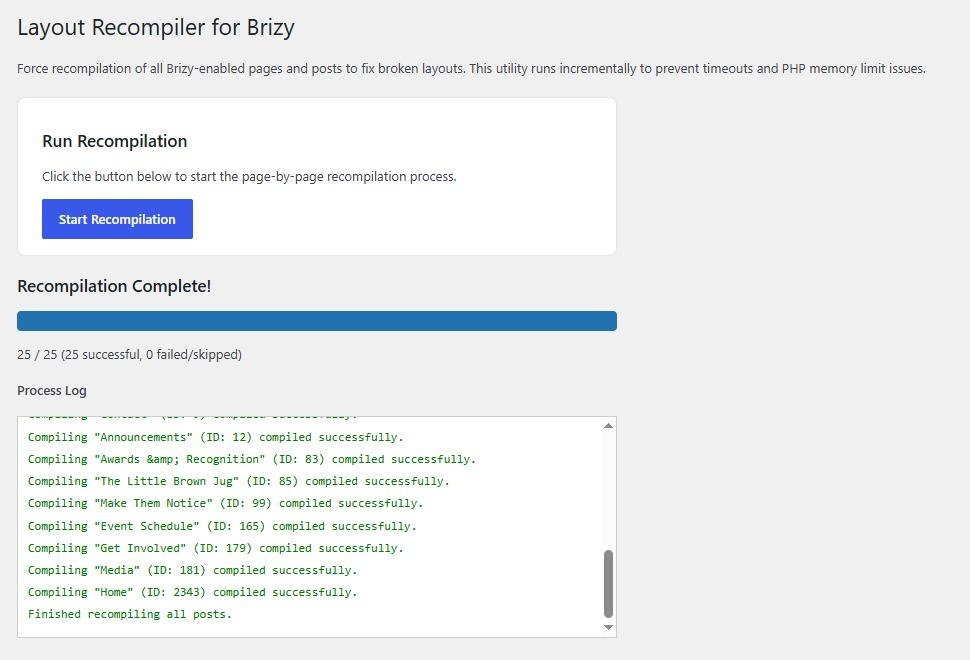
- Real-time Logging: Displays a detailed progress bar and status feed in your admin area to show successful compilations or skipped layout assets.
Brizy Builder Dependency and Service Disclosure
This plugin requires Brizy Builder to be active while recompilation runs. It does not add analytics or tracking.
Only after an administrator confirms recompilation, the plugin calls Brizy Builder’s WordPress compiler classes. Brizy may send the page identifier, Brizy and Brizy Pro versions, compiler download URLs, and the editor configuration needed to compile the layout to the compiler service configured by Brizy. The service returns generated page, project-style, and global-block output that Brizy stores in WordPress. This communication is provided and controlled by Brizy Builder rather than by this plugin.
Brizy Builder terms: https://www.brizy.io/terms
Brizy Builder privacy policy: https://www.brizy.io/privacy-policy
Resolving Collapsed Page Widths (Blocksy Companion Conflict)
The Layout Recompiler can fix instances where full-width pages have suddenly collapsed to the default container width. If you are experiencing this layout issue due to a conflict with Blocksy Companion, follow these steps:
- Deactivate Blocksy Companion Premium temporarily.
- Run the Layout Recompiler queue to completion (100%).
- Once finished, reactivate Blocksy Companion Premium and check the front-end of your site to see if the issue is resolved.
Recommendations for Complex Sites
For highly complex websites, we recommend temporarily disabling non-essential third-party plugins before running the recompilation process to ensure a clean execution. However:
* WooCommerce Sites: If your website uses dynamic templates to generate shop pages, cart/checkout areas, or product queries, WooCommerce and its essential related add-ons must remain active.
* Dynamic Fields (ACF): Similarly, if your layouts rely heavily on Advanced Custom Fields (ACF) or other dynamic content engines to fetch database fields, those plugins must remain enabled during recompilation.
Skjámyndir
Uppsetning
- Make sure the extracted plugin folder is named
layout-recompiler-for-brizy. If you downloaded GitHub’s automatic source archive, rename itsbrizy-fix-mainfolder before uploading it. - Upload the
layout-recompiler-for-brizyfolder to your/wp-content/plugins/directory. - Activate Layout Recompiler for Brizy from your WordPress Plugins menu.
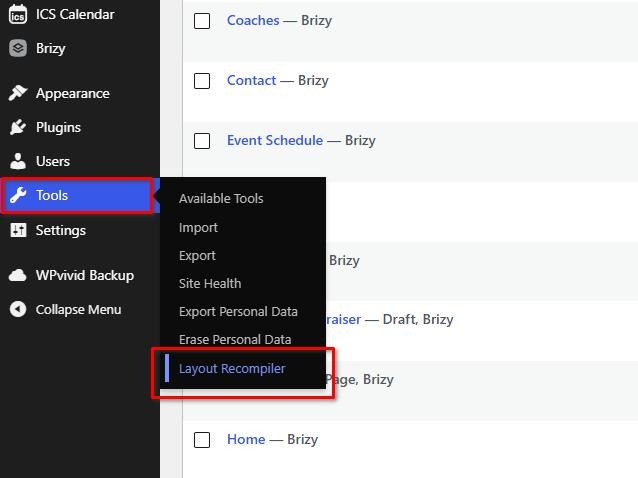
- Navigate to Tools > Layout Recompiler in your WordPress Admin Sidebar.
- Click Start Recompilation and let the queue progress to 100%.
You can watch the screencast here: https://youtu.be/aOkBbAWAcWI
SOS
-
Is it safe to use?
-
The plugin uses Brizy’s own compiler to refresh generated page and global layout output. It is designed to preserve saved designs, and keeping a recent backup provides an easy restore point if another plugin or site configuration affects the result.
-
What should I do after compiling?
-
Once the recompilation process is complete and you have verified that your layouts are fixed, you can safely deactivate and delete the plugin. It does not need to run continuously.
Umsagnir


Þátttakendur & höfundar
“Layout Recompiler for Brizy” er opinn hugbúnaður. Eftirfarandi aðilar hafa lagt sitt af mörkum við smíði þessarar viðbótar.
Höfundar
Translate “Layout Recompiler for Brizy” into your language.
Interested in development?
Browse the code, check out the SVN repository, or subscribe to the development log by RSS.
Breytingarsaga
1.5.6
- Restricts direct recompilation to published Brizy pages and posts.
- Prevents global blocks, headers, footers, saved sections, and layouts from being compiled as standalone records.
- Keeps shared global-element updates within Brizy’s normal page compilation response.
1.5.5
- Adds per-item completion records to skip unchanged Brizy content on later runs.
- Adds final manifest snapshots so shared global elements are recorded in their final compiled state.
- Adds successful-run tracking and confirmation before recompilation begins.
- Allows Brizy and Layout Recompiler for Brizy to be deactivated independently while retaining runtime compatibility checks.
- Some UI tweaks.
1.5.2
- Shows the optional review invitation only after the recompilation queue completes.
- Improves the review invitation spacing and emphasizes the plugin name.
1.5.1
- Added a non-intrusive invitation on the plugin’s own Tools page to leave an honest WordPress.org review.
1.5.0
- Removed the missing-media scan and placeholder-repair tools so this plugin focuses exclusively on layout recompilation.
- Retained the existing page-by-page AJAX recompilation workflow and Brizy asset URL compatibility handling.
1.4.4
- Added blank placeholder creation for missing Brizy media when yellow fallback blocks are not desired.
- Blank placeholders can replace only plugin-created yellow placeholders or fill missing upload paths; real media files are never overwritten.
- Improves handling for Brizy background-image sections where removing a yellow placeholder can reveal the section fallback color.
1.4.3
- Added an option to remove yellow placeholder files created by the plugin.
- Existing yellow placeholders are now detected during the media scan and clearly marked in the report.
- The create and remove placeholder actions run in small batches and never overwrite or delete real media files.
1.4.2
- Improved Missing Brizy Media Scan so it can detect media references generated in rendered Brizy beta output.
- Fixed cases where the media scan reported no missing files even though the front end showed broken Brizy images.
1.4.1
- Added compatibility handling for Brizy and Brizy Pro asset URLs on subdirectory WordPress installs.
- Fixed an issue where Brizy beta could load front-end CSS and JavaScript from duplicated paths, causing pages to appear unstyled.
1.4.0
- Adds a missing Brizy media scanner with a clear report of missing local files, source links, and affected pages.
- Adds yellow placeholder creation for missing upload paths without overwriting existing files or changing database content.
1.3.0
- Enqueues JavaScript externally and maps internal hex UID titles to clear descriptions.