

Lýsing
Someone gives your organization $50, receives a thank-you email, and then hears nothing ever again. They never find out whether it bought school books or disappeared into overheads. That silence is the single biggest reason first-time donors don’t give twice.
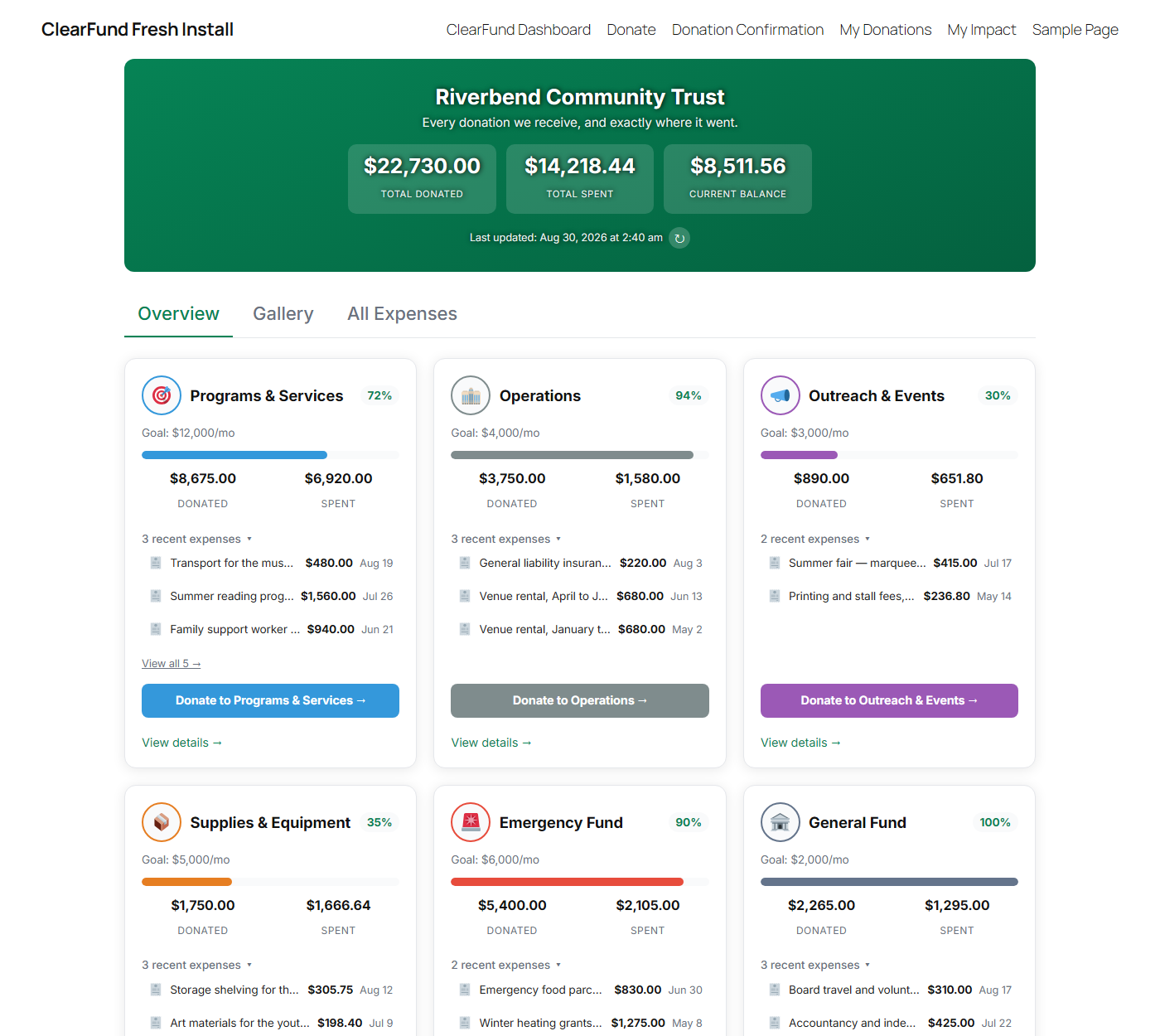
ClearFund closes that gap. It publishes a live page on your own site showing every category you’re raising for, how much has come in, exactly what’s been spent — and a photographed receipt for each purchase. No spreadsheets emailed on request, no annual PDF report nobody opens. Your supporters can check for themselves, whenever they like.
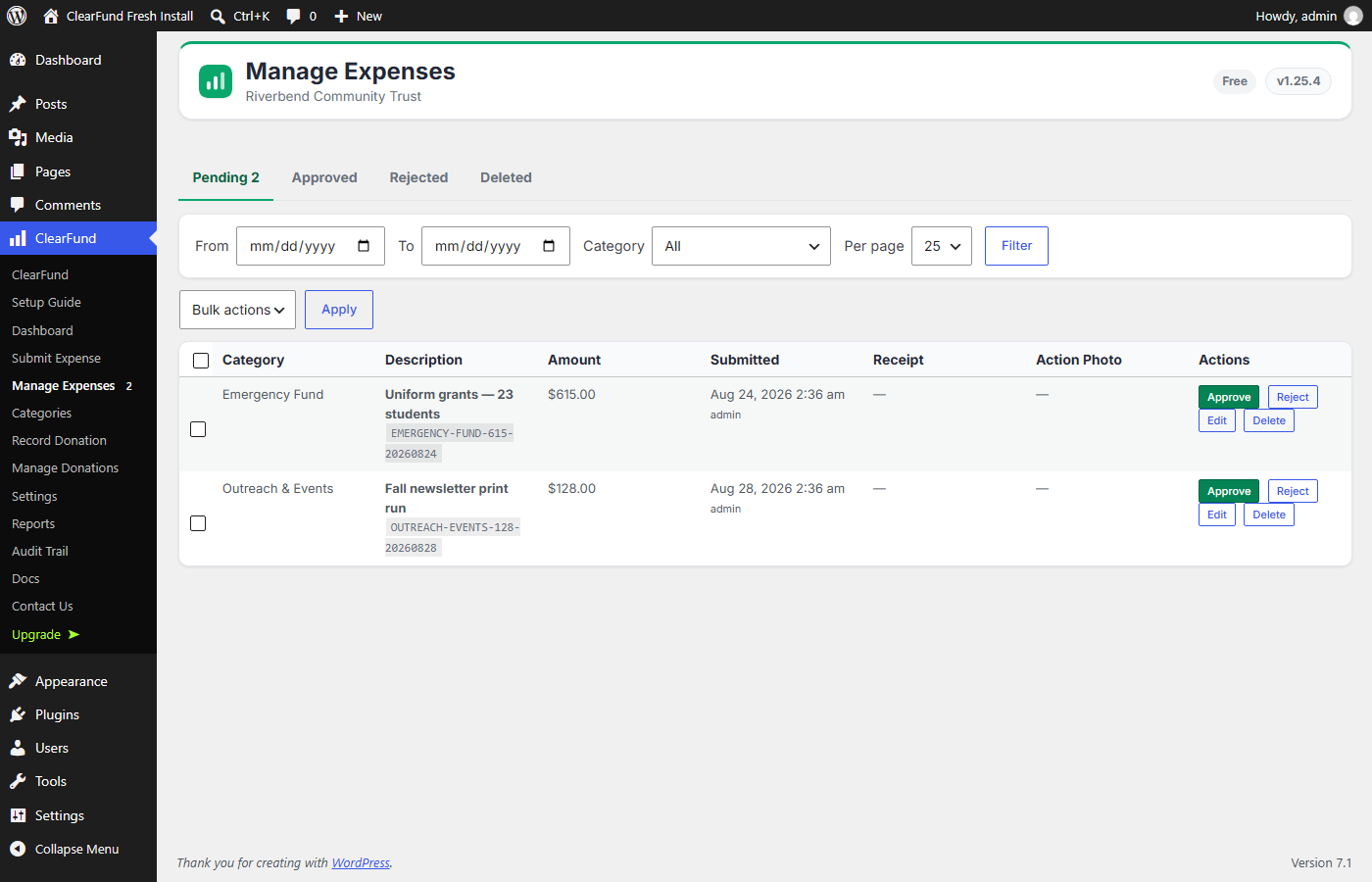
Your field staff submit expenses from their phone with a receipt photo attached. You approve them. They appear on the public page. That’s the whole loop.
ClearFund doesn’t take payments — it works alongside the donation plugin you already use, currently GiveWP or MissionWP, and pulls donations in automatically. You can also record cash, bank transfers and grants by hand, so the public picture includes money that never touched your website.
Key features
- Per-category donation pools — organize giving into categories (e.g. Food, Medicine, Education) each with its own goal and running balance.
- Receipt-backed expense tracking — field staff submit expenses with a receipt photo and an optional „in use“ action photo.
- Approval workflow — expenses stay private until an administrator approves them, then appear on the public dashboard. Optional auto-approve for small teams.
- Manual donations — record donations received outside GiveWP (cash, bank transfer, grants) per category, with an optional donor name, source note, and backdated date.
- Public transparency dashboard — a shortcode that shows donated vs. spent vs. balance per category, plus a gallery and full expense history.
- Email digests — automatic weekly or monthly transparency reports to your admins and (optionally) your newsletter subscribers.
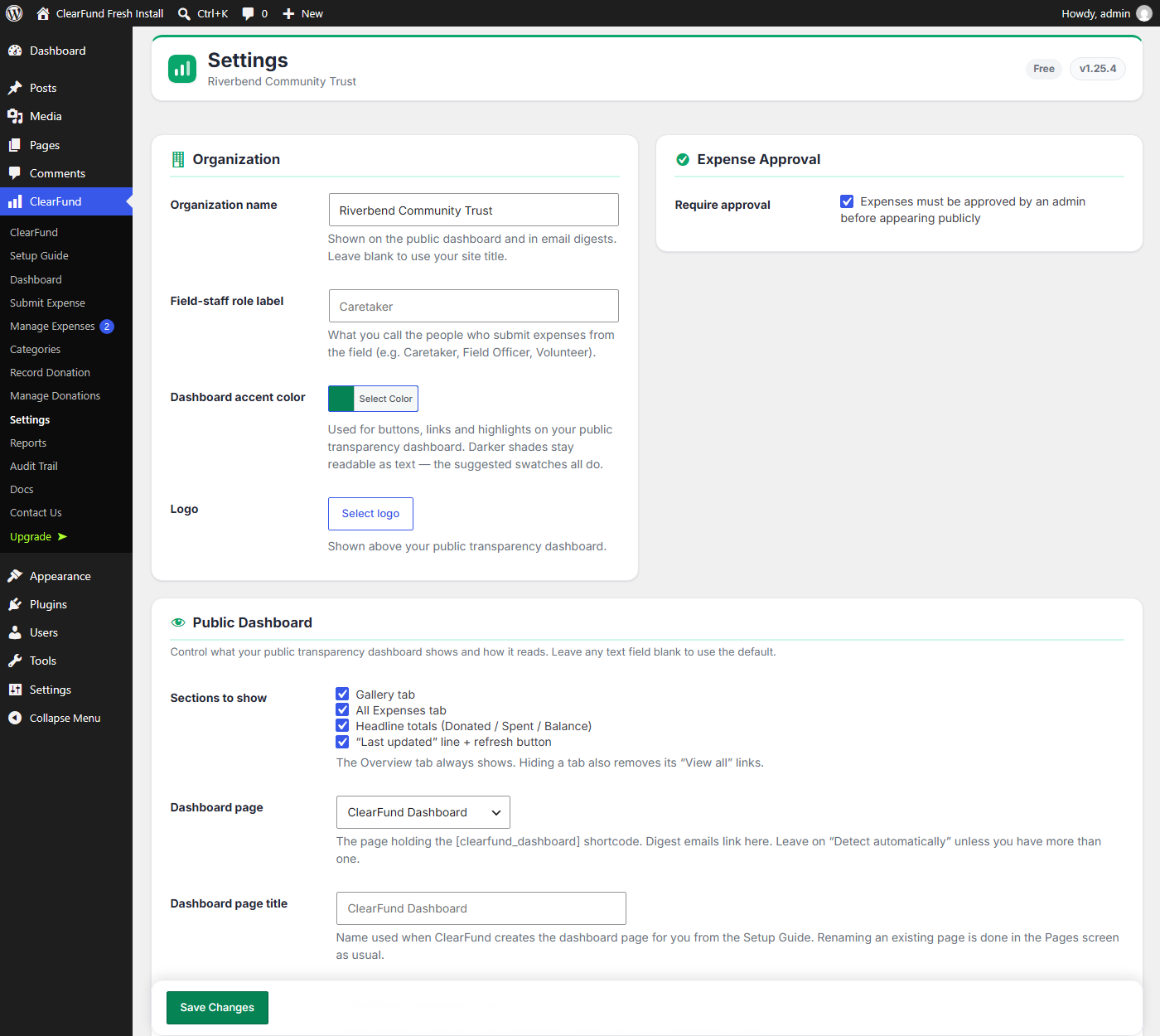
- White-label — configurable organization name, field-staff role label, and base currency, so it fits any non-profit. Nothing identifies ClearFund to your donors: the optional „Powered by ClearFund“ mark is off unless you switch it on.
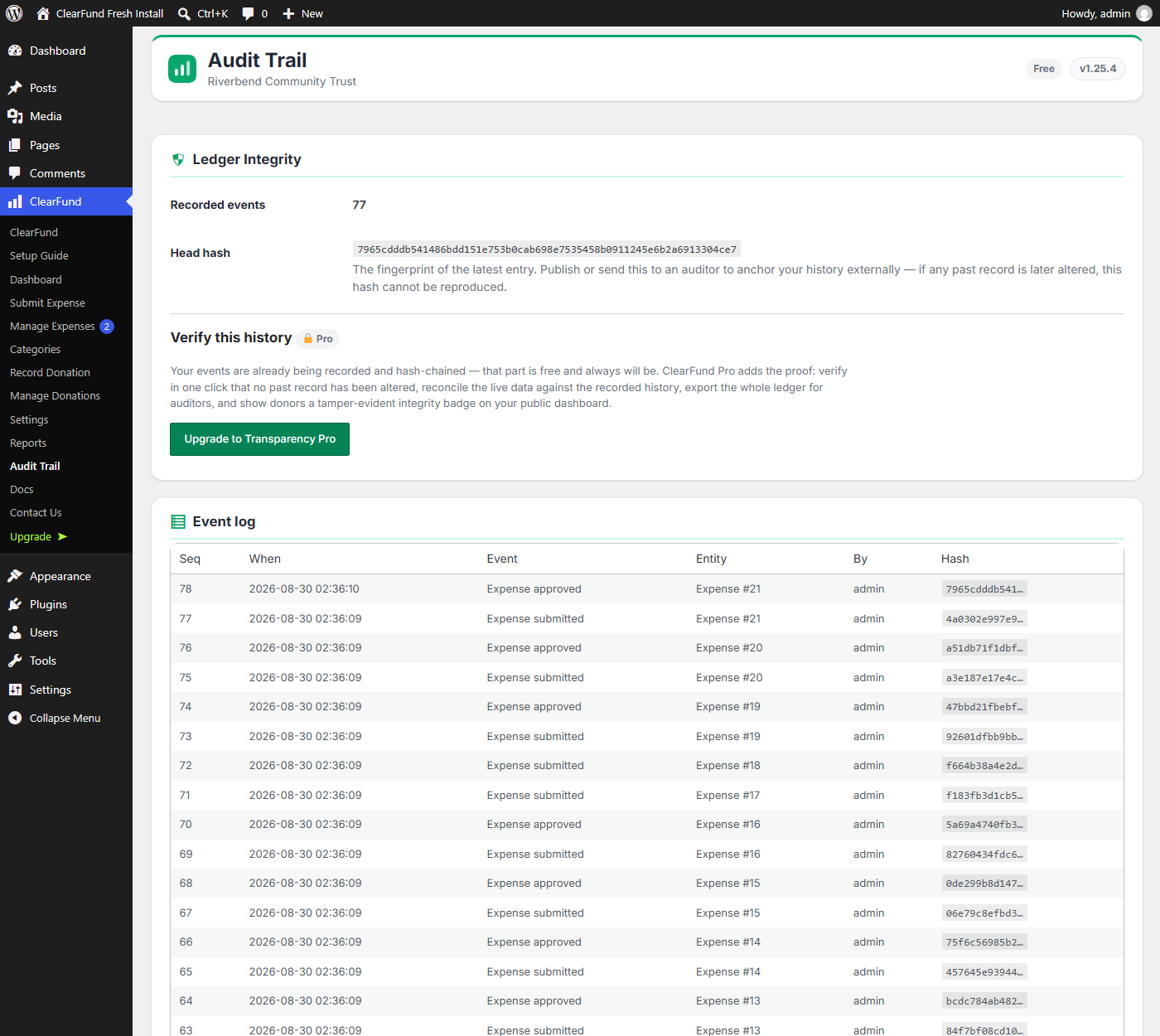
- Tamper-evident audit trail — every donation and expense event is recorded and hash-chained as it happens, and the log is readable on every install.
- Integrations — GiveWP for donations, Brevo for email digests and subscribers.
Shortcodes
[clearfund_dashboard]— the public transparency dashboard.[clearfund_subscribe]— a newsletter signup widget (ideal on your donation confirmation page).[clearfund_my_impact]— a logged-in donor’s personal money-tracing page showing exactly which expenses their donations funded. Registered only by the separate ClearFund Pro build; this plugin does not include it.
What’s included
Everything you need to run a transparent ledger is here, free and unlimited — there is no cap on categories, expenses, donations or traffic, and no trial that expires:
- Unlimited donation categories, each with its own goal and running total
- Receipt-backed expense tracking with an approval workflow
- Manual donation recording for cash, bank transfers and grants
- The public transparency dashboard (shortcode and Gutenberg block)
- GiveWP and MissionWP donation syncing, including in-form category choice
- Weekly or monthly email digests, and the Brevo newsletter integration
- Tamper-evident ledger recording — every donation and expense is hash-chained as it happens, on every site — and a readable Audit Trail of every recorded event
ClearFund Pro is a separate plugin download, not an unlock. The plugin you install from WordPress.org contains only the free features listed above; the Pro code is not present in it in any form, and nothing in it can be switched on by a license key, constant or setting. Buying Pro downloads a different, larger build of ClearFund from Freemius, which replaces this one. Cancelling reverses that: you go back to this build.
ClearFund Pro adds, for organizations that need them:
- Audit Trail — verify the hash chain on demand, catch changes made directly in the database, export the ledger as CSV/JSON for auditors, and show a public integrity badge
- Donor money-tracing — let a donor follow their own gift to the exact purchases it paid for, plus the
[clearfund_my_impact]personal page - Donor Impact Emails — automatically email donors when their gift is spent
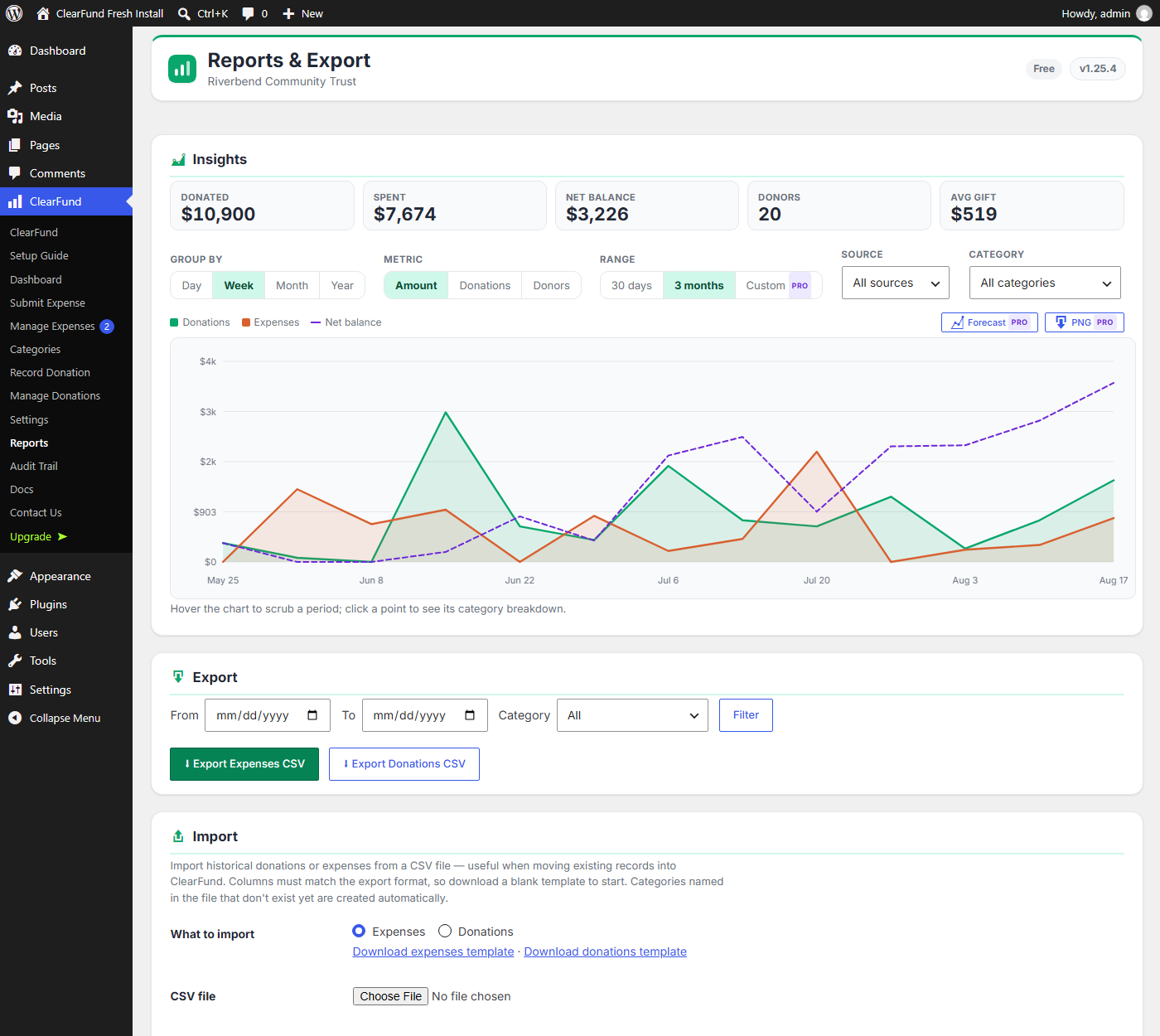
- Deeper Insights — arbitrary custom date ranges, forecasting, PNG export
- Multi-currency — let field staff record expenses in a local currency, auto-converted
- Appearance — hero background gradients and images with a readability overlay
Details and pricing at clearfund.ing.
External Services
ClearFund works without any external service. The following are optional and only contact a third party once you have entered your own credentials or enabled the feature.
ExchangeRate-API (ClearFund Pro only — this plugin contains no currency-conversion code and never contacts it) — in Pro, used only when you enable a secondary (field) currency, to convert expense amounts into your reporting currency. Each conversion sends the two currency codes and your API key to v6.exchangerate-api.com. No donor or expense data is sent. Terms and Privacy: https://www.exchangerate-api.com/terms
Brevo — used only when you enter a Brevo API key, to send transparency digest emails and to add newsletter subscribers. Sends the subscriber’s email address, optional first name, and digest content to api.brevo.com. Terms: https://www.brevo.com/legal/termsofuse/ — Privacy: https://www.brevo.com/legal/privacypolicy/
Freemius — handles licensing, updates and checkout for the paid features. Contacts api.freemius.com to validate a license and check for updates. Diagnostic/usage data is only sent if you opt in when activating. Terms: https://freemius.com/terms/ — Privacy: https://freemius.com/privacy/
Privacy
ClearFund stores donation records in your own WordPress database and sends nothing to us. Depending on how you use it, those records can include a donor’s name and email address — captured from GiveWP or MissionWP, or typed in when you record a donation by hand. Email addresses are used to match a donor to their own giving history on the „My Impact“ page and, if you enable Donor Impact Emails, to write to them; every such email carries a one-click unsubscribe link and opt-outs are honoured permanently.
You control what supporters can see. A new install does not publish donor names: logged-out visitors see „A supporter“, and you have to change Settings Donor Privacy before a name is visible to the world. Donations given anonymously always show as „Anonymous“. Donation amounts and the expenses they funded are public — that is the point of the dashboard — but no name is attached to them unless you have opted in.
Uninstalling ClearFund leaves your data in place by default, so an accidental deactivation can never destroy your ledger. If you genuinely want it erased, tick the option under Settings Advanced before you delete the plugin.
See External Services above for the three optional integrations and exactly what each one transmits.
Skjámyndir
Blocks
This plugin provides 1 block.
- ClearFund Dashboard Public donation transparency dashboard — per-category pools, expenses, and receipts.
Uppsetning
- Upload the
clearfundfolder to/wp-content/plugins/, or install the plugin through the WordPress Plugins screen. - Activate the plugin through the Plugins screen in WordPress.
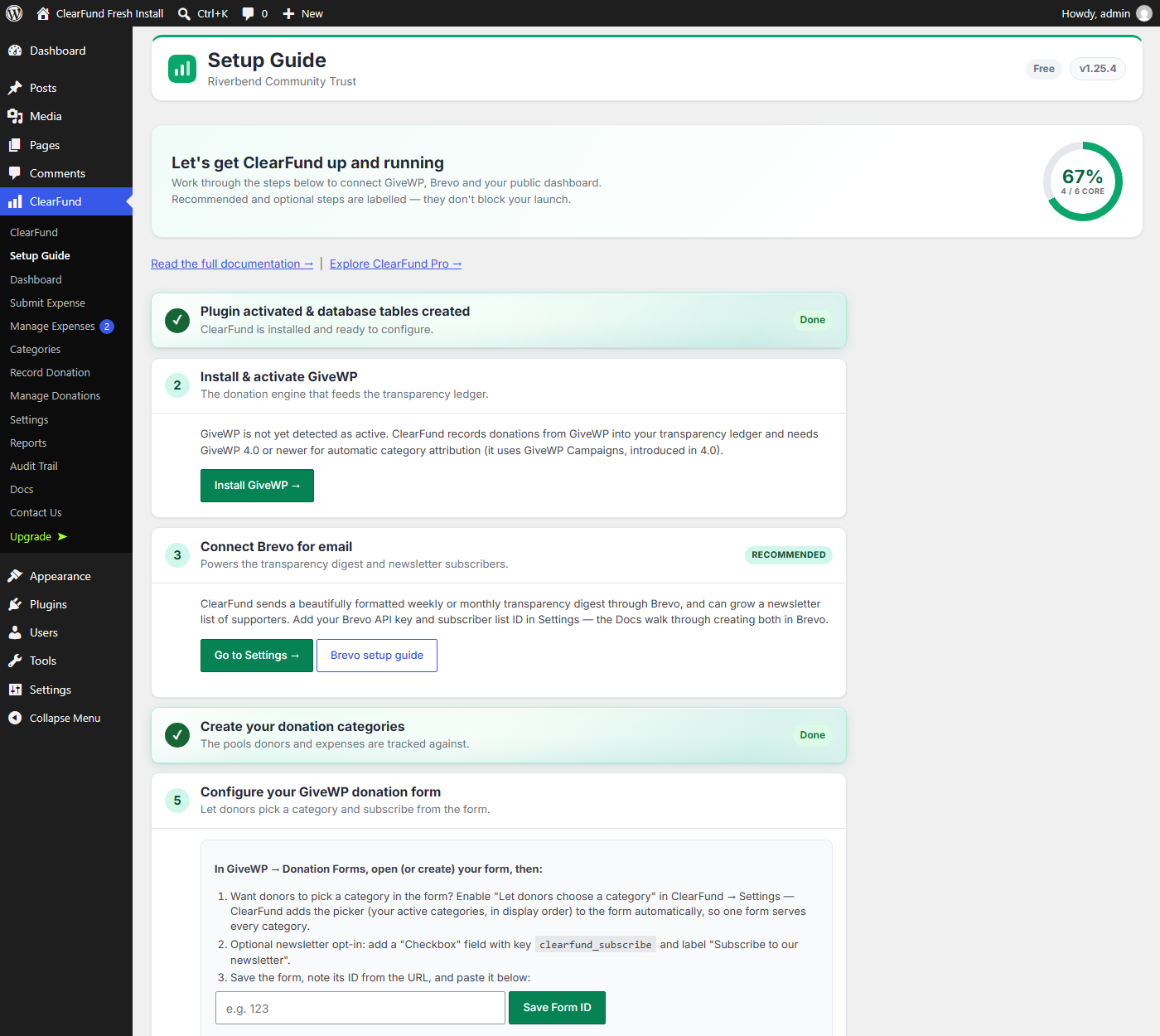
- Open ClearFund Setup Guide and follow the steps.
- Create your donation categories under ClearFund Categories.
- Add
[clearfund_dashboard]to a page to publish your transparency dashboard.
Requirements
- WordPress 6.0+
- PHP 8.0+
- GiveWP 4.0+ (recommended, for recording donations). Automatic category attribution uses GiveWP Campaigns, which require GiveWP 4.0 or newer; on older GiveWP, donations are recorded under the General Fund.
SOS
-
Does ClearFund process payments?
-
No. ClearFund records and reports where donations are allocated and spent. Donation collection is handled by GiveWP (or your existing payment setup).
-
Can staff record expenses in a different currency?
-
Not in this plugin. You set your base (reporting) currency under ClearFund Settings, and every expense is recorded in it. Recording expenses in a second, local currency with automatic conversion is part of the separate ClearFund Pro download; no conversion code ships here.
-
Who can submit expenses?
-
Administrators and users with the dedicated field-staff (Caretaker) role. Regular subscribers cannot submit expenses or upload files.
-
How do donors see where their money went?
-
Add the
[clearfund_dashboard]shortcode to any page. It shows each category’s donated, spent, and remaining balance, plus receipts and photos for every approved expense.
Umsagnir
There are no reviews for this plugin.
Þátttakendur & höfundar
“ClearFund” er opinn hugbúnaður. Eftirfarandi aðilar hafa lagt sitt af mörkum við smíði þessarar viðbótar.
Höfundar
Translate “ClearFund” into your language.
Interested in development?
Browse the code, check out the SVN repository, or subscribe to the development log by RSS.
Breytingarsaga
1.27.0
- New: ClearFund warns you when its scheduled tasks stop running. The daily balance history behind Insights, the digest and donor emails all run on WordPress’s scheduler (WP-Cron), which some servers block without telling anyone. If one of ClearFund’s tasks is still overdue two hours after it was first noticed, a warning appears on the Dashboard and ClearFund screens, and a check appears in Tools Site Health, explaining the likely cause and how to fix it. The warning clears itself as soon as the task runs.
- The Troubleshooting guide now gives the exact cron job to add for your site.
1.26.2
- Fixed: on a brand-new install, the „Complete the Setup Guide“ link in the welcome notice could open a „Sorry, you are not allowed to access this page“ screen if you had not yet answered the opt-in prompt. It now takes you to that prompt first, then straight on to the Setup Guide.
1.26.1
- Database housekeeping only — nothing changes in how the plugin behaves, and no data moves.
- Every column and index name in ClearFund’s tables is now quoted. Some of them (such as
event,dateandhash) are words MySQL also uses for its own purposes, and which words those are differs between database versions, so quoting all of them keeps the tables safe to create on any server. - Fixed a long-standing inefficiency in the same code: on every activation and every update, ClearFund was asking the database to re-apply sixty column definitions that were already correct. It was harmless but wasteful, and on a large site it made updates slower than they needed to be. Updates now make no schema changes at all unless there is a real one to make.
1.26.0
- Internal names now all start with
clearfund_instead of the two-lettercf_, which several unrelated plugins also use. 1.24.0 did this for the plugin’s code; this release finishes the job for the parts stored in your database — its tables, options, the expense-submission capability and the ClearFund admin page addresses. - Your data moves with it. The upgrade runs automatically the first time the new version loads: nothing is deleted, nothing is rewritten, and your donations, expenses, categories, settings and audit trail come across untouched. Your Caretakers keep their permissions, and the audit trail keeps its original signing key, so its recorded history stays continuous across the change.
- One thing to redo: any browser bookmark straight to a ClearFund admin screen. The addresses changed from
admin.php?page=cf-…toadmin.php?page=clearfund-…, so an old bookmark will land on a „page not found“. The ClearFund menu in your dashboard sidebar works as it always did. - If you added ClearFund’s category or „email me about my gift“ field to a GiveWP or MissionWP form by hand, its field id changed from
cf_category/cf_notify_impacttoclearfund_category/clearfund_notify_impact. Update the id on your form so donor choices keep reaching the right category. Fields ClearFund adds for you need no action.
1.25.9
- Donor names are no longer shown to the public by default. A new install shows „A supporter“ to logged-out visitors; you opt in under Settings Donor Privacy if your donors expect to be named. Anonymous gifts always show as „Anonymous“. This control used to be part of the paid version — it is now free on every install, because protecting a supporter’s name is not something to sell. Existing sites keep their current setting.
- Housekeeping for the WordPress.org review: admin JavaScript is now loaded through the standard WordPress enqueue functions instead of being written inline into the page, and the plugin no longer loads its own translations — WordPress does that automatically for plugins it hosts. No visible change.
- The „Powered by ClearFund“ mark is now OFF by default and free to switch on or off, under Settings Branding. Nothing identifies ClearFund to your donors unless you choose it. Previously the mark was shown by default and only a paid licence could remove it.
- Insights now charts your full history on every install. The free build previously capped the chart at the last twelve months; that limit is removed, and the Range control gains „12 months“ and „All time“.
- The plugin no longer contains any feature that is present but switched off. Multi-currency conversion, custom date ranges, forecasting, PNG export, money tracing, donor impact emails, ledger verification and custom hero styling are part of the separate ClearFund Pro download and are simply not in this plugin — rather than being here behind a padlock.
- Settings shows only settings that exist. The empty „Premium“ cards and the locked chart buttons are gone, along with the upgrade prompts attached to them.
1.25.8
- Coding-standards housekeeping ahead of the WordPress.org review. Request values are now read through the standard WordPress sanitizing functions (
absint(),sanitize_key(),sanitize_text_field()) rather than plain casts, so what protects each value is legible to the review tooling as well as correct. - No change to what the plugin does or how it looks.
1.25.7
- Removed the
Author URIplugin header. No functional change.
1.25.6
- The main plugin file is rewritten in a documentation voice. No functional change.
1.25.5
- Housekeeping for the WordPress.org listing. Output escaping in the admin screens is now written at each point of output instead of hidden inside a helper, so what protects each value is visible in the code rather than declared in a config file.
- No change to what the plugin does or how it looks.
1.25.4
- Changed: US English throughout the plugin’s text and the demo data — color, organization, license — matching ClearFund’s USD default. No functional change.
1.25.3
- Changed: the public dashboard hero is now a soft gradient in a deeper brand green, with white text — easier to read than the old flat bright-green band. If you picked your own accent or hero color, that color still drives the hero.
- Fixed: the plugin now ships its icon, so the WordPress updates screen stops showing a gray placeholder next to ClearFund.
- Fixed: pages made by „Auto-create pages“ now lay the dashboard out full-width, instead of squeezing it into the theme’s text column where the category grid became one card per row. Existing pages are left untouched.
- Fixed: the dashboard page no longer repeats its page title above the hero on themes that offer a title-less page template.
1.25.2
- Fixed: the dashboard hero heading could look smeared on a fresh install — the text shadow now follows the text color instead of always being black.
- Fixed: the Gallery tab’s „no action photos yet“ message was split across two columns.
1.25.1
- Internal: removed a leftover reference to premium code from the free build. It was unreachable, so nothing behaved differently, but the free plugin should not mention code it does not contain.
1.25.0
- ClearFund now ships as two builds from one codebase. This free plugin no longer contains the Pro code at all — it is not shipped-and-locked, it is not shipped. ClearFund Pro is a separate, larger download from Freemius that replaces this build.
- The
CLEARFUND_PREMIUMconstant, thecf_premium_overridesetting and theclearfund_is_premiumfilter no longer exist in this build. There is nothing here for them to unlock, so a leftover constant or database row is simply ignored. - Free sites can now READ their Audit Trail. Every donation and expense has always been recorded and hash-chained on every site; that log is now browsable rather than hidden behind an upgrade prompt. Verifying the chain, reconciling it against live data, re-baselining, exporting for auditors and the public integrity badge remain Pro.
- Existing Pro customers: your site moves to the ClearFund Pro build automatically. Your data, settings, license and pages are unaffected — the two builds share the same database tables, so nothing is migrated or rewritten.
1.24.0
- Every internal function, class and constant is now prefixed
clearfund_/ClearFund_rather than the shortercf_/CF_, which several unrelated plugins also use. This removes a real risk of two plugins defining the same name and taking the site down. AJAX endpoints and script handles were renamed to match. Your data, settings, pages and bookmarks are unaffected. - If you define
CF_PREMIUMorCF_LEDGER_KEYinwp-config.php, rename them toCLEARFUND_PREMIUMandCLEARFUND_LEDGER_KEY. If you use thecf_is_premiumorcf_can_featurefilters, they are nowclearfund_is_premiumandclearfund_can_feature. - Plugin header now declares its WordPress and PHP requirements, license URI and translations directory.
- Coding-standards pass across the plugin, and the standards check now blocks CI instead of reporting and passing anyway.
1.23.3
- A brighter, more logo-like brand green across the plugin — the admin header, banners, progress bars, icons and charts. Links and buttons use a slightly deeper shade of the same green so text keeps meeting accessibility contrast guidelines. Sites that chose their own accent color are unchanged.
- Removed the Pro „page text“ color option: body text on your public pages now always follows your theme. The hero text color option is unchanged.
1.23.2
- New: a soft drop shadow behind your hero text, so the heading and tagline stay readable when the hero band is a photo or a light color. On by default in black; you can turn it off or pick a different color under Settings Public Dashboard.
1.23.1
- The Save button on the longer admin screens (Settings, Submit Expense, Record Donation, Categories) now stays visible at the bottom of the screen, so you no longer have to scroll to the end of the form to save a change made near the top.
1.23.0
- New look: the default accent is now ClearFund’s bright brand green, applied so every piece of text still meets accessibility contrast guidelines. Sites that chose their own accent color are unchanged.
- Improved color pickers with suggested accessible swatches for the accent and hero colors.
- New (Pro): hero background gradients and image backgrounds with a readability overlay, plus optional custom text colors for your public pages.
1.22.3
- Maintenance: updated the bundled Freemius SDK (licensing and updates library) to the latest release, bringing upstream fixes and support for more currencies.
1.22.2
- Improved contrast on two status colors so they are easier to read: the „integrity verified“ label on your public dashboard, and the completed-step markers in the Setup Guide.
1.22.1
- Updated the ClearFund logo and refreshed the default accent color to match it. As before, sites that have chosen their own accent color are unchanged.
1.22.0
- New (Pro): white-label branding. A small „Powered by ClearFund“ mark now appears at the foot of your public dashboard, the My Impact page and your donor emails — and Pro can switch it off under Settings Branding, so supporters only ever see your organization.
- Refreshed brand colors. The default accent is now a blue that meets WCAG AA contrast for normal text; the previous default fell below it when used as a link color. Sites that already chose their own accent color are unchanged.
- Hardened admin input handling throughout, and narrowed the Setup Guide’s save-setting endpoint to the single field it actually writes.
- The ClearFund logo now appears in Documentation Getting Started.
1.21.0
- New (Pro): Donor Impact Emails. Automatically email each donor when their donation is put to work, showing the exact expenses it funded and their share of each. Choose a daily or weekly cadence in Settings Donor Impact Emails, or leave it off.
- Donors opt in on the donation form (a checkbox, on by default) on GiveWP and MissionWP, and you can set it per donation when recording a manual gift. Every email carries a one-click unsubscribe link.
- Preview exactly what donors receive with the “Send test impact email” button. Turning the feature on starts from now — past donations are never back-emailed.
Earlier releases
Versions 1.0.0 through 1.20.13 are recorded in full in CHANGELOG.md in the plugin’s source repository.